What If Your Next Outbound Campaign Took 10 Minutes to Build?Youkti's Conversational Campaign Builder Does Just That
Author
Youkti
Build signal-triggered outbound campaigns in 10 minutes, just by chatting with Youkti's ARYA. No flowcharts, no engineers, no RevOps backlog.
It's Monday Morning. The Pipeline Is Empty. The Engineers Are Busy.
Meet Priya. She's the SDR Manager at a 200-person B2B SaaS company. Her team of 15 SDRs is expected to hit 60-120 qualified meetings this month. The problem? The last outbound campaign they ran dried up three weeks ago, and the new one (targeting Enterprise SaaS companies showing hiring surges and funding signals) is stuck in a RevOps backlog.
The workflow needs to be set up in the CRM. Someone needs to define the signal triggers. Someone needs to map the cadence logic. Someone needs to write the conditional rules for different account types. And none of that someone is Priya, because she doesn't have access to the backend, and the one RevOps person on the team is heads down on a different project until Thursday.
It's Monday. The pipeline isn't going to fill itself.
This is the moment Youkti's Conversational Campaign Builder was built for.
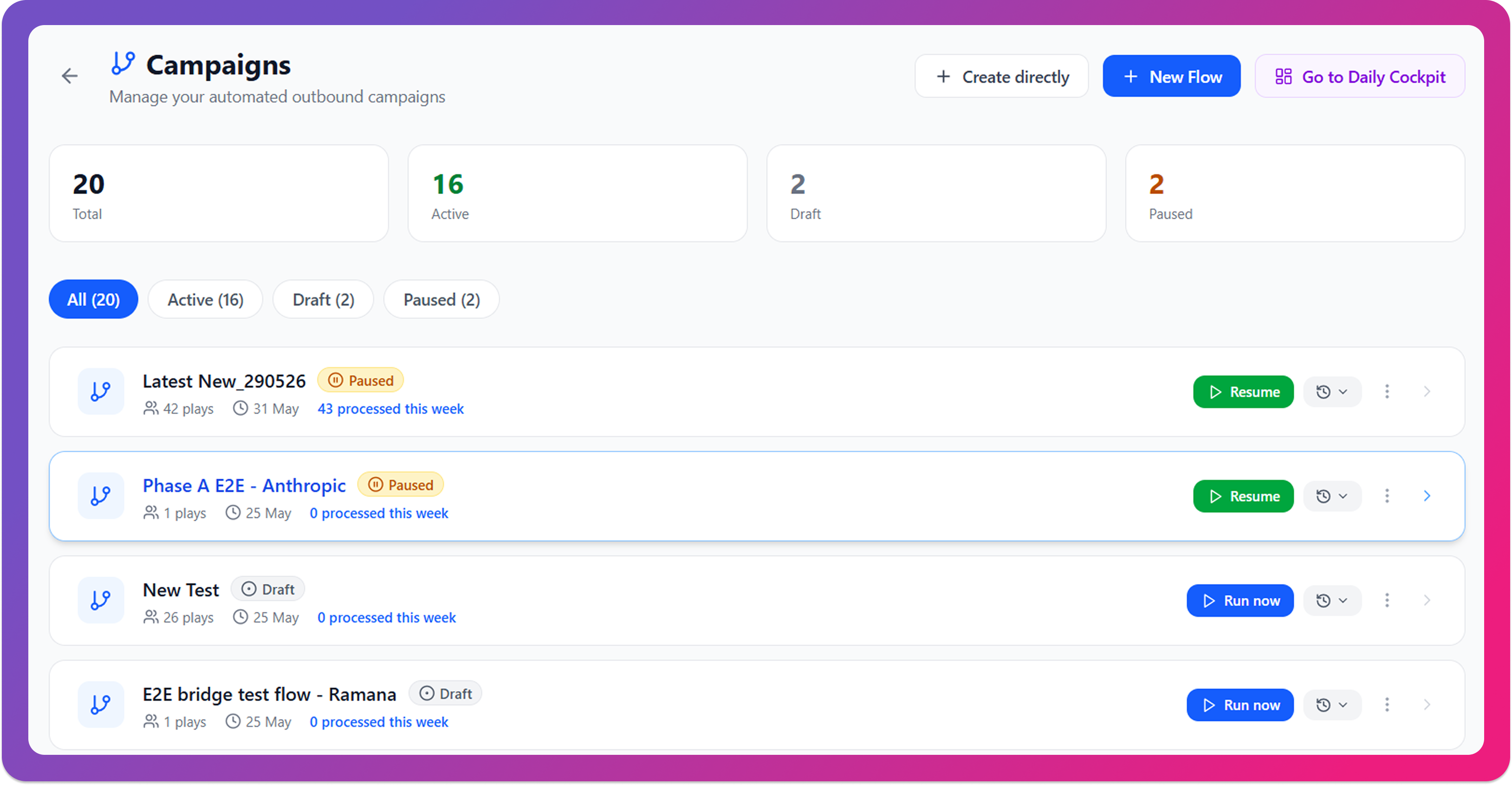
Step 1: She Opens Campaign Builder. ARYA Already Knows Her Setup.
ARYA is an agentic co-pilot, the intelligence layer that powers the Conversational Campaign Builder. It is not a chatbot layered on top of a form. ARYA understands GTM context: your ICP, your competitors, your signals, and your motion. It builds campaigns through natural language conversation and updates configuration in real time as you chat.
Priya clicks New Flow inside Youkti. She expects a blank form. What she gets instead is ARYA, already one step ahead.
ARYA says:
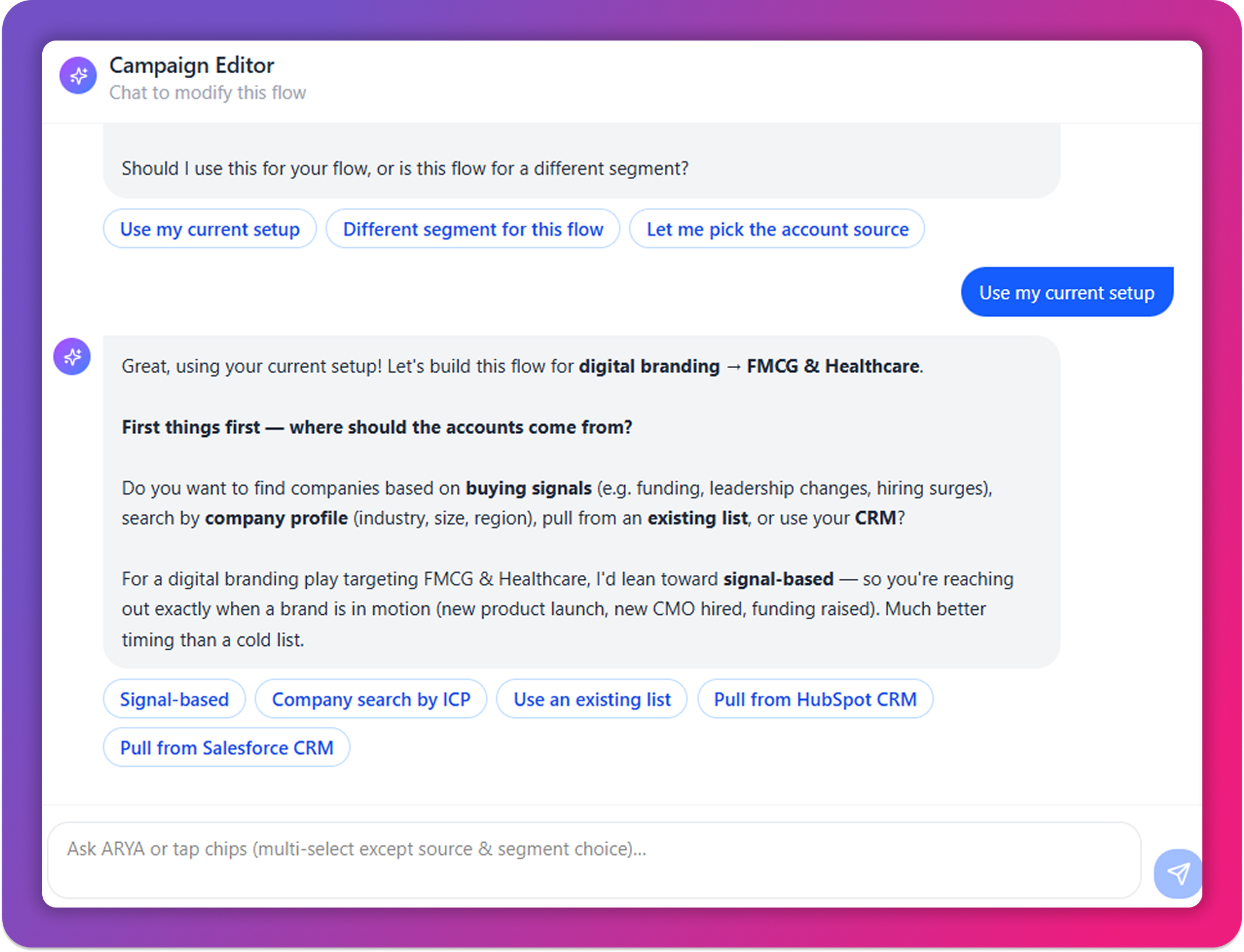
“Hey there! I'll help you set up an automated outbound flow. I already know a few things about your setup: Target ICP: Software, Computer and Network Security, IT Services and IT Consulting. Should I use this for your flow, or is this flow for a different segment?”
Priya selects “Use my current setup.” ARYA already has her ICP. She doesn't retype a word.
This is the first thing that's different about Campaign Builder. It isn't a blank canvas. It's a collaborative partner that remembers what it knows about your business and builds from there.
Step 2: She Describes What She Wants. ARYA Builds It Live.
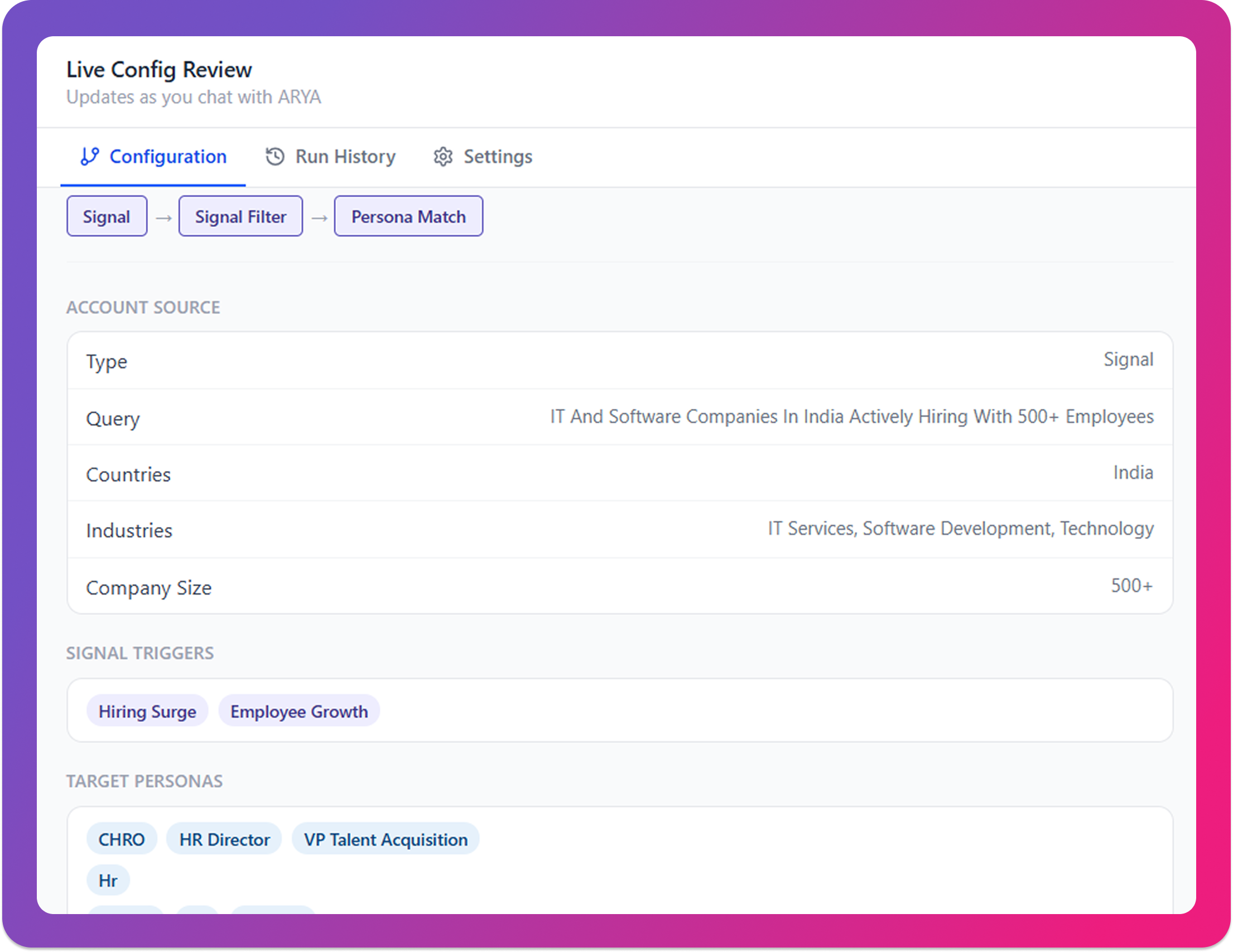
Priya works directly in the builder, typing out each campaign element one by one.As she goes, the live preview panel on the right side of the screen populates in real time, she can watch the entire campaign take shape as she builds it. No form to submit. No page to reload.
Account Source
Signal
Segment
Enterprise SaaS
ICP Source
Arya Setup
Industries
Software, Computer and Network Security, IT Services and IT Consulting
Funding Stages
Series A, Series B, Series C
Employee Ranges
101–250, 251–500, 501–1000
Pipeline
Every step of the campaign is wired, as she talks. This is what Youkti calls a Conversational GTM. Not a static workflow. Conversation in, config out.
Step 3: ARYA Picks the Right Signals, All 20+ of Them
Priya didn't just say “send emails to IT companies.” She said she wants to reach companies when something is happening: when they're hiring, when they've just raised money, when a champion has moved, when a competitor gets a bad mention.
What is a buying signal in outbound sales?
A buying signal is a detectable event or behavior that indicates a company may be entering a buying window, such as a funding announcement, leadership hire, competitor mention, or hiring surge. Youkti's Campaign Builder monitors 20+ such signals in real time, automatically triggering outreach when intent is detected.
ARYA monitors a deep catalog of buying signals across Priya's target accounts:
Growth Signals
Funding Raised, Hiring Surge, Employee Growth, Expansion Signal
People Signals
Leadership Change, Job Change, Champion Move, New Leader
Competitive Signals
Competitor Negative Mention, No Demo Tool
Financial & Market Signals
Financial Pressure, SEC Filing, Earnings Signal, Glassdoor Decline
Engagement Signals
Reddit Mention, LinkedIn Activity, Partnership Announcement, Product Launch, Tech Stack Change
Each signal tells a different story about where a company is in its buying journey. A company that just raised Series B and is in a hiring surge is in a very different headspace than one where a single LinkedIn post was detected. ARYA knows the difference, and it uses that to decide not just who gets reached, but how.
Step 4: ARYA Sets the Outreach Rules: Tone, Cadence, Volume, Based on the Signal
This is where most campaign tools stop. They let you pick a cadence. They don't change your strategy based on what caused the outreach in the first place.
ARYA does this automatically:
Funding raised + Hiring surge
5 emails, daily cadence, aggressive tone. The window is short and intent is high.
Competitor negative mention
Competitive angle messaging. The context demands it.
Single early-stage signal
Consultative, lower-pressure sequence. They're not ready for the hard sell yet.
Priya didn't configure these rules manually. She described her intent. ARYA translated it into logic.
Step 5: Persona Match - ARYA Finds the Right People Inside Each Account
Getting the account right is only half the job. Getting to the right person inside that account is where most outbound falls apart.
Priya tells ARYA which personas she wants to reach: VP Sales, VP Engineering, CTO, Head of Product. ARYA matches contacts within each qualified account automatically, surfacing the right titles and seniority levels, across C-Suite, VP, and Head-level roles.
No manual list building. No LinkedIn scraping in a separate tab. The persona layer is part of the campaign flow, not an afterthought.
Step 6: Email Personalization - One Email Per Prospect, Not a Blast Template
Here's something Priya notices when she reviews the email configuration: Mode: One email per prospect. Locked. Cannot change after creation.
This is intentional. ARYA doesn't generate a single template and blast it to 200 people. For every prospect, it generates a unique, context-aware email that references the specific signal detected about their company, speaks to their persona and role, and matches the tone and urgency appropriate to the situation.
The VP of Sales at a company that just raised Series B gets a different email than the CTO at a company where a competitor was mentioned. Both emails come from the same campaign. Neither reads like a template.
Step 7: Push to Outlook, Every Morning at 9am
The campaign is live. ARYA pushes emails to Outlook on a daily schedule at 9am. Priya's SDRs open their inboxes each morning to a fresh set of signal-triggered, persona-matched, contextually written outreach, ready to review before sending.
No manual exports. No copy-pasting. No “I forgot to run the sequence” on Fridays. The campaign runs itself.
The Result: From Monday Morning Crisis to Live Campaign in 10 Minutes
Let's go back to Priya. It's still Monday morning. But instead of waiting until Thursday for RevOps, she opened Campaign Builder, chatted with ARYA for 10 minutes, and watched a fully configured outbound campaign build itself in real time: signals selected, personas matched, outreach rules set, push schedule configured.
By 10am, her SDRs have fresh, signal-triggered emails in their Outlook inboxes. By end of week, the pipeline is moving again.
No flowcharts. No rule engines. No if-else logic. No engineering ticket. Just a conversation. Watch the full video below!
What Makes Campaign Builder Different From Every Other Tool
Youkti is built for teams that run outbound at scale and need their campaigns to adapt to real-world buying signals, not static schedules.
Priya had used other outbound tools before. Sequence builders. CRM workflow editors. “AI-assisted” campaign platforms that handed her a form and called it intelligent.
The difference with Youkti's Campaign Builder isn't just the interface. It's the inversion of responsibility.
Every other tool asks you to build the logic. You define the if-else conditions. You configure the branches. You map the fields. Campaign Builder inverts this: you describe what you want, and ARYA builds it. The configuration is the output of the conversation, not a prerequisite to it.
And when Priya's ICP shifts next month, or a new signal becomes relevant, she doesn't rebuild the workflow from scratch. She opens the Campaign Editor, tells ARYA what changed, and watches it update. Minutes, not months.
Frequently Asked Questions
What is a Conversational Campaign Builder?
A Conversational Campaign Builder is a tool that lets you create outbound sales campaigns by describing what you want to an AI, instead of manually configuring workflows, rules, and sequences. Youkti's Campaign Builder uses ARYA to translate plain English instructions into fully configured, signal-triggered outbound campaigns in real time.
How long does it take to build an outbound campaign with Youkti?
Most campaigns are fully configured in under 10 minutes through a conversation with ARYA, including signal selection, persona matching, outreach rules, and push schedule.
What signals does Youkti's Campaign Builder support?
Youkti monitors 20+ buying signals including Funding Raised, Hiring Surge, Employee Growth, Leadership Change, Job Change, Competitor Negative Mention, Tech Stack Change, Product Launch, LinkedIn Activity, and more, across Growth, People, Competitive, Financial, and Engagement categories.
Does Campaign Builder integrate with Outlook?
Yes. Completed campaigns push directly to Outlook on a configurable daily schedule (default: 9am). Teams can review emails before sending or configure auto-send depending on their workflow.
Can I edit a campaign after it goes live?
Yes. Open any active campaign's Campaign Editor and chat with ARYA to modify signal triggers, personas, outreach rules, or any configuration detail. Changes reflect live in the Config Review panel instantly.
Do I need a RevOps or engineering team to use Campaign Builder?
No. Campaign Builder is fully self-serve. Any SDR manager, head of sales, or demand gen lead can build and launch a complete outbound campaign through a conversation with ARYA. No technical support required.
What makes Youkti's outreach personalization different?
ARYA generates one unique email per prospect, not a blasted template. Each email references the specific signal detected about that company, is written for that contact's persona and role, and matches the tone and urgency of the signal context.